Springs Hosting
  • 0 Shopping Cart
  • Home
  • Store
    • Browse All
    • Shared Website Hosting
    • Managed WordPress
    • Cloud Servers
    • Security Certificates
    • Colocation
    • Register a New Domain
    • Transfer Domains to Us
  • Announcements
  • Knowledgebase
  • Network Status
  • Affiliates
  • Contact Us
  • More
  • Account
    • Login
    • Forgot Password?
  1. Portal Home
  2. Knowledgebase
  3. Shared Hosting
  4. Backing Up MySQL Databases

  Categories

Administration of Servers
10
Running Your Website
4
Shared Hosting
53
SSL
2
VPS
7

  Categories

  Tag Cloud

Staging WordPress

  Support

My Support Tickets
Announcements
Knowledgebase
Downloads
Network Status
Open Ticket

Backing Up MySQL Databases Print

  • 9

Step 1) Login to cPanel.

Step 2) Click on phpMyAdmin in the Databases box.
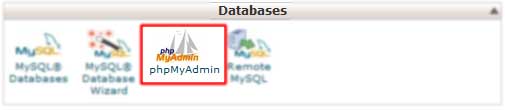
Step 3) Click on the database you want to backup.

Step 4) Click the Export tab at the top.

Step 5) Make sure "Quick" is slelected.

Step 6) Make sure SQL is selected.

Step 7) Click on Go an you will be prompted to save the database to your computer.

Looking to restore your backed up database, look here.


Was this answer helpful?

Related Articles

How do I login to cPanel? Many tasks to manage your website require you to login to cPanel. This can be achieved by... How do I create an email account or email forwarder? This guide assumes you know how to login cPanel and the domain has been added to you account.... How do I use my email account? After setting up your email account in cPanel, you can access it a few different ways. Springs... Should you use POP or IMAP for mail? Springs Hosting offers two protocols when checking for mail: POP and IMAP. Using POP, your email... FTP Accounts   You can connect to your hosting account through plain FTP or FTPS. We currently don't support...
« Back

  Tag Cloud

Staging WordPress

  Support

My Support Tickets
Announcements
Knowledgebase
Downloads
Network Status
Open Ticket
  • Contact Us
  • Terms of Service

Copyright © 2026 Springs Hosting. All Rights Reserved.


Loading...
Loading...

Generate Password

Please enter a number between 8 and 64 for the password length